Why Are Screen Printing Edges Jagged? Common Causes and Solutions
Why Are Screen Printing Edges Jagged? Causes and Solutions
In screen printing, jagged or rough edges are a common problem, especially when printing small text, logos, and fine graphics.
Many printers have experienced this issue: Why do my printed edges look uneven? How can I improve the edge quality?
A Real Example of Jagged Screen Printing Edge
The image below shows a real printing example. The edge quality can be affected by screen preparation and printing parameters.
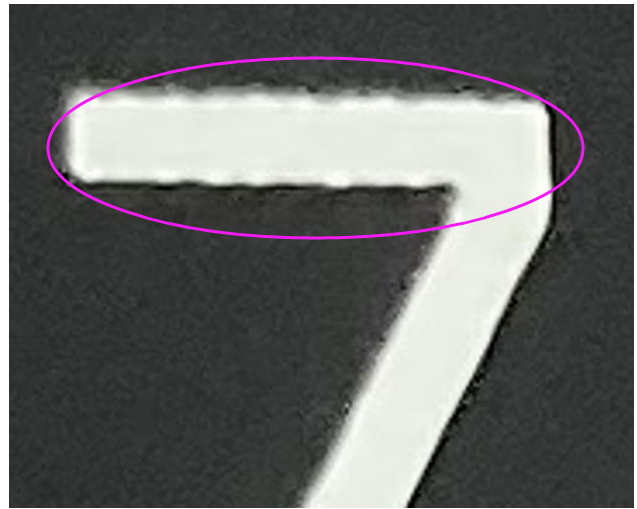
Real printing example: The edge quality can be improved by optimizing screen preparation and mesh angle.
Why Do Screen Printing Edges Become Jagged?
The edge of a screen-printed image is affected by the mesh structure. When the mesh direction, tension, or exposure condition is not properly optimized, the printed edge may show a stair-step or jagged effect.
Common causes include:
- Incorrect mesh angle
- Uneven mesh tension
- Improper exposure condition
- Unsuitable mesh selection
How Can We Improve Jagged Printing Edges?
To achieve smoother and cleaner edges, the screen-making process needs to be optimized first.
- Select a suitable mesh count for the artwork
- Maintain stable mesh tension
- Optimize exposure parameters
- Adjust the mesh angle according to printing requirements
How Does 22.5° or 45° Mesh Angle Help?
In traditional 0° mesh stretching, the mesh direction may align with the graphic edge. This can make the mesh pattern more visible and create uneven edges.
By rotating the mesh to 22.5° or 45°, the mesh openings are no longer aligned with the artwork edge. This helps reduce the stair-step effect and creates smoother printing edges.
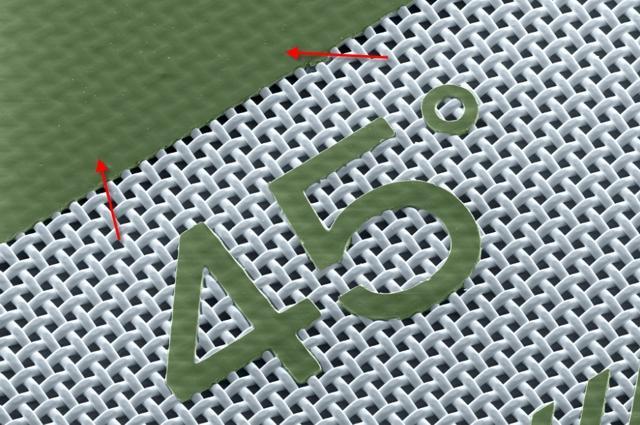
22.5° vs 45° Mesh Angle
| Mesh Angle | Application |
|---|---|
| 22.5° | Good balance between printing quality and ink release. Suitable for general fine printing applications. |
| 45° | Better for high-precision printing, small text, fine lines, and detailed graphics. |
Conclusion
Jagged edges are usually caused by several factors, including mesh selection, tension, exposure, and mesh angle.
By optimizing screen preparation and printing parameters, printers can achieve smoother edges, sharper details, and better printing results.

A Real Example of Improved Jagged Screen Printing Edge
A small improvement in screen preparation can make a big difference in final print quality.